


Table Of Contents

7 Best Phone Tracker Apps Without Permission in 2026
You need to know where someone is — but you can’t ask them directly, and you definitely don’t want to install anything on their device. Whether you’re a parent checking on a teenager, or you’ve lost your own phone, finding the right tool that works without physical access or explicit permission isn’t as simple as a quick app store search.
Most tracking apps require you to touch the target device, root it, or hand over login credentials. A smaller number work without any of that. This list covers 7 of the best phone tracker apps without permission, with real pricing, honest pros and cons, and a clear recommendation for each use case.
Quick Comparison: Phone Tracker Apps at a Glance
| Tool | Tracking Method | Requires App Install on Target? | Starting Price | Best For |
|---|---|---|---|---|
| Scannero | Phone number + SMS link | No | $0.89 trial / $49.80/mo | No-install tracking by number |
| mSpy | App installed on target device | Yes | $11.66/mo (yearly) | Full parental monitoring suite |
| Hoverwatch | App installed on target device | Yes (Android) | $8.83/mo (yearly) | Multi-device Android tracking |
| Eyezy | App (Android) / iCloud (iOS) | Yes / No for iOS | ~$9.99/mo (yearly) | Location alerts + social media |
| KidsGuard Pro | iCloud (iOS) / App (Android) | No for iOS | $8.32/mo (yearly) | iPhone tracking without install |
| FlexiSPY | App installed on target device | Yes | ~$68/mo | Advanced monitoring + call recording |
| Detectico | Phone number + SMS link | No | $29.99/mo | Quick number-based location only |
1. Scannero — Track Any Phone by Number, No Install Needed
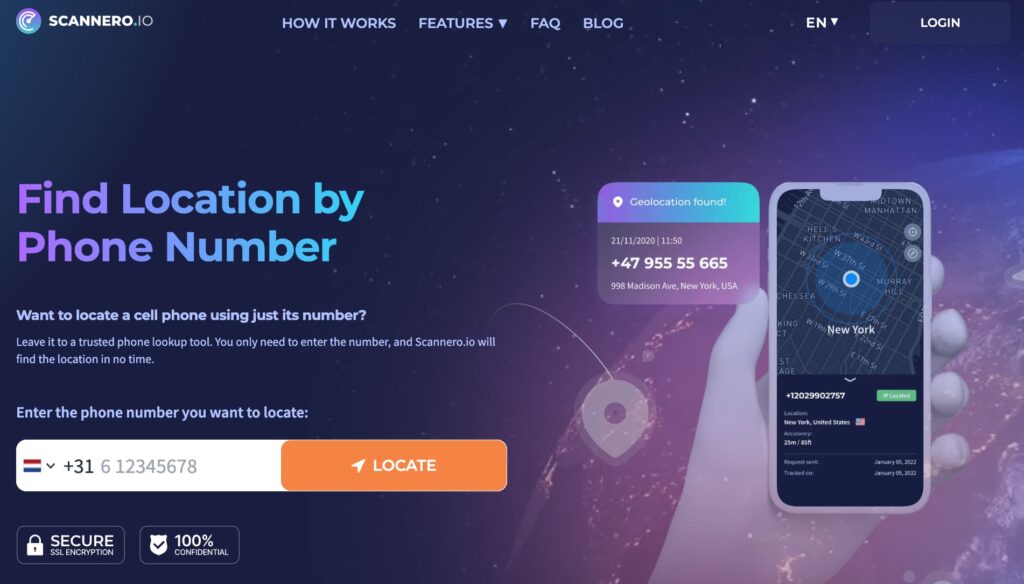
When you need to locate someone’s phone and can’t get your hands on the device, most tracking apps immediately become useless. They need installation time, physical access, or the target’s iCloud password. That’s exactly the problem Scannero solves.
Scannero is a web-based phone number tracking service. You enter a phone number, write a custom message, and Scannero sends an SMS containing a tracking link to that number. Once the recipient taps the link, you see their real-time location — including GPS coordinates, street address, and a map view — directly in your Scannero dashboard. There’s nothing to install on either device. No app on your phone, nothing on theirs.
Unlike install-based trackers like mSpy or Hoverwatch that require minutes of access to the target device before monitoring begins, Scannero only needs the number. That distinction matters most to parents who want a quick location check without going through their child’s phone.
Key features include:
- Real-time GPS location delivered to your dashboard once the tracking link is tapped
- Works on all phone types: iPhone, Android, basic flip phones, any carrier
- Anonymous tracking — the recipient doesn’t see who sent the request
- Custom message editor — write your own text or choose a pre-set template so the link looks natural
- Reverse phone lookup and username search included in the subscription
- Data leak checker and anonymous voice message feature bundled at no extra cost
Pricing: Scannero offers a 24-hour trial for $0.89. After that, it runs $49.80 per month. That monthly plan covers unlimited devices — you can track multiple numbers under one subscription, which makes it more cost-effective than it first appears if you have more than one child to monitor.
Pros:
- No installation on the target device — works entirely by number
- Covers every phone type and carrier, including international numbers
- Unlimited device tracking under one monthly subscription, unlike most competitors that charge per device
- Beginner-friendly interface with no technical knowledge required
Cons:
- Tracking only activates when the recipient clicks the link — passive background monitoring is not available
- Location history is not stored; once per session, not continuous tracking
Who it’s best for: Parents who want a fast, no-setup location check on a child’s phone, individuals trying to locate a family member using only a phone number, or anyone who needs a simple, no-install tracking solution without committing to a full monitoring suite.
Ready to try it? Visit Scannero and start with the $0.89 trial — you’ll have a location result in under five minutes. For a deeper breakdown of the service, see our Scannero review.
2. mSpy — Full Monitoring Suite for Parents

mSpy has been one of the most recognized names in parental monitoring since 2010. It installs as a hidden app on the target Android or iOS device and runs continuously in the background, recording activity to an online dashboard you access from any browser.
Key features include:
- GPS location tracking with real-time updates and location history
- Keylogger that records every keystroke typed on the device
- Social media monitoring across WhatsApp, Snapchat, Instagram, Facebook, and more
- Geofencing with email alerts when the device enters or exits a defined zone
- Call logs, SMS access, browser history, and app usage reports
Pricing: mSpy’s yearly plan runs $11.66 per month (billed annually). The quarterly plan is $27.99 per month, and the monthly plan is $48.99 per month.
Pros:
- Comprehensive monitoring beyond location — covers social media, messages, and calls
- Strong iOS support without requiring a jailbreak for basic features
- Reliable background operation with consistent data syncing
Cons:
- Requires physical access to the target device for initial installation
- Advanced social media monitoring on Android requires root access
Best for: Parents who want ongoing, deep monitoring of a child’s Android or iPhone, including social media activity and messaging — not just location.
3. Hoverwatch — Multi-Device Android Tracker

Hoverwatch is a strong choice for users who need to track multiple Android devices simultaneously on one plan. Once installed on a target device, it runs in stealth mode and logs a wide range of activity, uploading data to an online control panel accessible from any browser.
Key features include:
- Location tracking using GPS, Wi-Fi towers, and cellular towers simultaneously for higher accuracy
- SIM card change alert — the app notifies you when someone swaps the SIM
- Automatic screenshot capture at set intervals
- Front camera photo triggered every time the device is unlocked
- Social media and messaging app logs, internet history
Pricing: Hoverwatch’s personal plan starts at $24.95 per month. The quarterly plan brings that down to $19.98 per month, and the annual plan to $8.83 per month.
Pros:
- Tracks up to 5 devices under one subscription — more cost-effective for multi-child households
- SIM swap detection is a unique feature absent from most competitors
- Works on Android, Windows, and Mac devices
Cons:
- Android-only for mobile; iOS support is not available
- Requires physical access to the device for installation
Best for: Families with multiple Android devices to monitor, or users who want a budget-friendly tracker with solid location accuracy on Android.
4. Eyezy — Location Alerts and Social Media Monitoring

Eyezy is a full-featured monitoring app that pairs GPS location tracking with a geofencing alert system and deep social media access. For Android, it requires app installation on the target device. For iOS, it works via iCloud credentials — no physical access to the iPhone needed.
Key features include:
- Pinpoint: GPS + Wi-Fi-based location tracking with movement history log
- Magic Alerts: custom geofence zones with notifications when the target enters or exits
- Social media monitoring: reads chats on Instagram, Snapchat, Messenger, TikTok, and more
- Keylogger that captures everything typed on the device
- Web browsing history and app usage logs
Pricing: Eyezy’s annual plan starts at approximately $9.99 per month. Monthly plans are available at a higher rate.
Pros:
- Magic Alerts geofencing works as real-time location intelligence, not just passive tracking
- iOS setup via iCloud is possible without touching the target iPhone
- Broad social media coverage across modern platforms
Cons:
- Dashboard interface has a learning curve; less intuitive than simpler tools
- Android installation requires brief physical access to the device
Best for: Parents who want location monitoring paired with social media oversight, particularly on iPhones where iCloud-based setup removes the need for device access.
5. KidsGuard Pro — iPhone Tracking Without App Installation

KidsGuard Pro from ClevGuard offers two separate versions — one for iOS and one for Android — each optimized for its platform. The iOS version is particularly notable: it uses iCloud data to track an iPhone’s location and activity without requiring any app installed on the target phone.
Key features include:
- iOS: iCloud-based location tracking, location history, and app activity without touching the device
- Android: real-time GPS, stealth background operation, social media monitoring
- Location history with timestamps and street-level address detail
- Geofencing and location alerts
- Call history and SMS access (Android version)
Pricing: KidsGuard Pro for Android runs $8.32 per month on the annual plan. The iOS version is $9.16 per month annually.
Pros:
- iOS version works without physical access — only iCloud credentials are needed
- Clean, simple dashboard with straightforward location history display
- Competitive annual pricing compared to mSpy and Eyezy
Cons:
- iOS tracking is limited to what iCloud syncs — real-time GPS accuracy depends on iCloud update frequency
- Social media monitoring only available on the Android version
Best for: Users who need to track an iPhone without accessing the device, or parents monitoring a child’s Apple device using only the iCloud account.
6. FlexiSPY — Advanced Tracker with Call Recording

FlexiSPY targets users who need more than location data. It’s one of the few phone tracking tools on the market that includes call recording — capturing both sides of phone calls made on the target device. This positions it as the deepest monitoring solution in this list, though it comes at a significantly higher price.
Key features include:
- Live call interception and call recording stored for later playback
- GPS location with accuracy detail (latitude, longitude, accuracy rating per reading)
- Geofencing with zone entry/exit alerts
- Access to photos, videos, and files stored on the device
- Social media and instant messaging monitoring across 14+ platforms
Pricing: FlexiSPY’s Premium plan runs approximately $68 per month. The Extreme plan, which adds call recording and live call listening, is approximately $119 per month.
Pros:
- Call recording is a rare capability absent from mSpy, Eyezy, and most competitors
- Granular location data with accuracy rating per GPS reading
- Broad app and platform coverage
Cons:
- Highest price point in this comparison by a significant margin
- Requires installation on the target device; some advanced features require rooting
Best for: Users who need full monitoring depth including call recording, typically for employer device monitoring or high-concern parental oversight situations.
7. Detectico — Track by Phone Number, No App Required

Like Scannero, Detectico uses a phone number and SMS link approach — no app installation required on the target device. Enter a number, send a tracking message, and once the recipient clicks the link, you receive their location on a map. It covers the same fundamental use case as Scannero but with a narrower feature set and different pricing.
Key features include:
- Phone number-based location tracking via SMS link
- Real-time location displayed on an interactive map
- No credentials or physical device access required
- Works on any phone type, any carrier
Pricing: Detectico offers a trial starting at $0.89. The standard subscription runs approximately $29.99 per month.
Pros:
- No device access needed — phone number is the only input required
- Simple, fast — tracking result arrives within minutes of link being tapped
Cons:
- Location tracking only — no social media, call logs, or activity monitoring
- Tracking only activates when the recipient taps the link; no passive background tracking
Best for: Users who only need a one-time or occasional location check using a phone number, without needing ongoing monitoring or additional features.
Is It Legal to Track a Phone Without Permission?
This is one of the most important questions to answer before using any tool on this list, and the answer varies based on who you’re tracking.
In most US states, parents have the legal right to monitor the phones of minor children living in their household — including tracking their location without informing the child. This applies broadly across parental control and family safety use cases.
For adults, the situation is different. Tracking another adult’s phone without their knowledge or consent is illegal in most jurisdictions under federal and state wiretapping and surveillance laws. This includes partners, employees (unless they’ve signed a monitoring agreement for company-owned devices), and anyone else who has not given explicit consent.
If you’re using a phone tracker for employee monitoring, the standard legal requirement in the US is that employees must be informed and have agreed — usually through a company device policy or employment contract.
The tools on this list are marketed for legal use cases: parental monitoring of minors, locating a personal device, and employer monitoring of company-owned equipment. For a full breakdown of the legal context, read our guide on is it legal to track someone’s phone.
Always consult local law before using any tracking software on a device you don’t own.
How to Choose the Right Phone Tracker App
With 7 tools covering different use cases, the right choice depends on what you actually need:
- No install required: Scannero and Detectico are the only tools here that work without touching the target device. Scannero also covers more features (reverse lookup, data leak checker, anonymous messages) and allows unlimited device tracking per subscription.
- iOS without device access: KidsGuard Pro’s iCloud-based tracking and Eyezy’s iOS setup both work using only iCloud credentials — no physical access to the iPhone needed.
- Full monitoring depth: If location is only part of what you need, mSpy and Eyezy both offer social media access, call logs, and keylogging at competitive annual prices. FlexiSPY is the option if call recording is a requirement.
- Budget: Hoverwatch and KidsGuard Pro are the most affordable at under $10 per month on annual plans, and both perform well within their respective use cases.
- Multiple devices: Scannero covers unlimited devices under one subscription. Hoverwatch tracks up to 5 devices per plan.
Final Thoughts
The best phone tracker app without permission depends on how much access you have and what you need to know. If you can’t touch the device and only have a phone number, Scannero gives you a real-time location result faster than any app-install-based tool — in under five minutes, from any browser, on any device. For deeper ongoing monitoring, mSpy and Eyezy offer the most complete feature sets at reasonable annual rates.
All seven tools in this list work for legitimate use cases. Use them accordingly, verify the legal requirements in your jurisdiction, and start with the trial before committing to a monthly plan.

Related posts
 May 25, 2026
 May 25, 2026
 May 25, 2026





