


Table Of Contents

8 Best Location Tracking Apps in 2026
Not all location tracking apps work the same way. Some require you to install software on the device you want to monitor. Others work through a phone number, sending a link that activates tracking the moment the recipient taps it. And some are built right into your phone’s operating system, free and ready to use without signing up for anything.
The right app depends entirely on your situation. A parent monitoring a teenager needs something different from someone trying to locate a lost Android phone or a person who wants to quickly check where a family member is without calling them. This list covers 8 of the best location tracking apps across all three scenarios, with verified pricing, honest pros and cons, and a clear recommendation for each use case.
Quick Comparison: Location Tracking Apps
| Tool | How It Works | App Install Required | Free Plan | Starting Paid Price | Best For |
|---|---|---|---|---|---|
| Scannero | Phone number + SMS link | No | No ($0.89 trial) | $49.80/mo | No-install tracking by number |
| Life360 | App on all family devices | Yes | Yes (basic) | $4.99/mo | Family location circles |
| Google Find My Device | Built into Android | No (built-in) | Free | Free | Lost Android device recovery |
| Apple Find My | Built into iOS/macOS | No (built-in) | Free | Free | Lost iPhone / Apple family sharing |
| mSpy | App installed on target device | Yes | No | $11.66/mo (yearly) | Deep parental monitoring |
| FamiSafe | App on parent + child devices | Yes | 3-day trial | $4.99/mo (yearly) | GPS + parental controls combined |
| GeoZilla | App on all family devices | Yes | Limited free | $5.83/mo (yearly) | Driver safety + emergency alerts |
| Glympse | Link-based, no account needed | No | Yes | $9.99/mo | Temporary one-time sharing |
Scannero — Track Any Number Without Installing an App
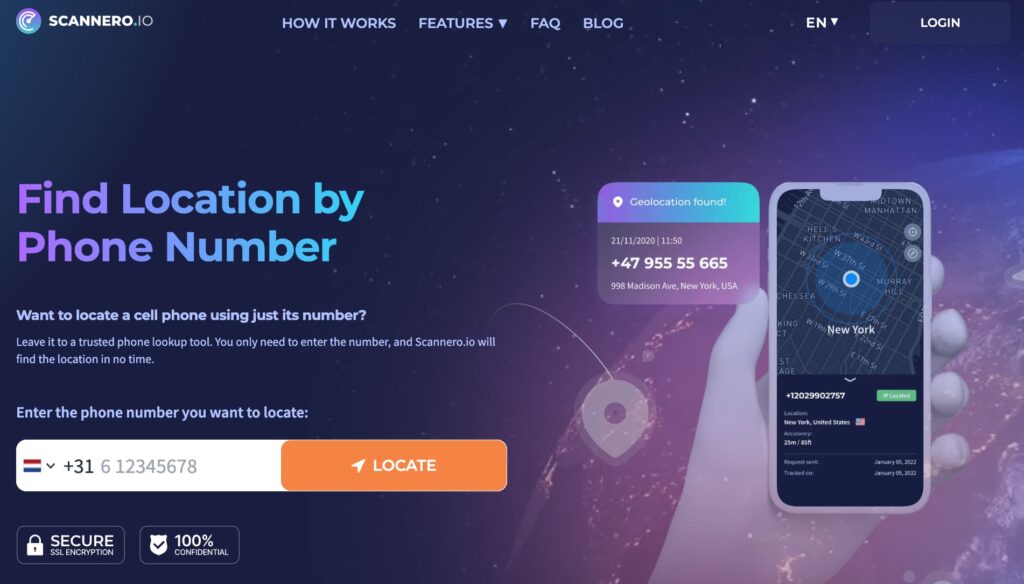
Most location tracking apps hit a wall immediately: you need access to the device you want to monitor before you can start monitoring it. If you can’t physically touch the phone — or don’t know the target’s login credentials — the majority of GPS trackers become useless before you even begin.
Scannero solves this differently. It’s a web-based location tracking service that works entirely from a phone number. You enter the number, write a message, and Scannero sends an SMS containing a tracking link to that device. When the recipient taps the link, their real-time GPS location appears on your dashboard — including street address, GPS coordinates, and an interactive map. There’s no app to install on either device, no iCloud login required, and no physical access needed.
Unlike install-based trackers such as mSpy or FamiSafe that require minutes of hands-on device setup before they start working, Scannero only needs the number. For a parent who wants a fast location check or anyone trying to locate a family member discreetly without touching their phone, that distinction is significant.
Key features include:
- Real-time GPS location delivered to the dashboard after the tracking link is tapped
- Works on any phone type, any carrier, any country — iPhone, Android, or basic handsets
- Anonymous — the recipient does not see who sent the location request
- Custom message editor — write your own text or use a pre-written template so the link looks natural
- Reverse phone lookup and username search included in the subscription
- Data leak checker that lets you verify whether your personal information has been exposed online
- Lost phone finder — send a tracking message to your own number to locate a missing device
- Unlimited devices tracked under one monthly subscription
Pricing: A 24-hour trial runs $0.89. After that, the monthly subscription is $49.80, which covers unlimited devices. If you have more than one person to track, that unlimited-device policy makes it more cost-effective than competitors that charge per device.
Pros:
- No installation on the target device — phone number is the only input required
- Works on every phone type and carrier including international numbers
- Unlimited devices under one subscription, unlike most per-device alternatives
- Simple three-step process: enter number, send message, view location
Cons:
- Location tracking only activates when the recipient taps the link — no passive background monitoring
- Does not store ongoing location history; each tracking session is initiated on demand
Who it’s best for: Parents who need a quick location check on a child’s phone without accessing it, individuals locating a family member by number, or anyone who needs a no-install location tracking solution without signing into another app.
Start with the $0.89 trial at Scannero — a location result typically arrives within five minutes of the link being tapped. For a full breakdown of the service, see our Scannero review.
Life360 — Best for Family Location Circles

Life360 is the most widely used family location sharing app on the market, with over 50 million users across 195 countries. It works by creating private “circles” — groups of family members who all share their live location on a shared map. Every circle member sees every other member in real time, and the app adds a layer of driving and safety intelligence on top of basic GPS.
Key features include:
- Real-time family map showing every circle member’s live location
- Geofencing place alerts — get notified when someone arrives at or leaves home, school, or work
- Driving reports with speed, route, and hard-braking data on paid plans
- Crash detection with automatic emergency contact notifications
- SOS alert button for members to send their location to the whole circle
Pricing: Life360 has a functional free plan with basic location sharing. Silver costs $4.99/month, Gold $14.99/month, and Platinum $24.99/month. Driving features and crash detection require a paid tier.
Pros:
- Free plan covers the basics for most family location sharing needs
- Crash detection is a genuinely useful safety feature for teen drivers
- Works on both iOS and Android in the same circle
Cons:
- Background GPS tracking drains battery noticeably — some users report 15–20% daily battery loss
- Free plan lacks driving reports and extended location history
- Some teens find continuous tracking intrusive, which can create friction within families
Best for: Families with mixed iOS and Android devices who want shared real-time visibility and are willing to pay for driving and safety add-ons.
Google Find My Device — Best Free Android Tracker
Google Find My Device is built into every Android phone with a Google account, which means most Android users already have it available without downloading anything. It’s primarily a lost-device tool, not a family tracking solution, but for locating a specific Android phone it’s accurate, instant, and completely free.
Key features include:
- Real-time location displayed on Google Maps when the device is online
- Remote ring — plays a loud sound even when the phone is on silent
- Remote lock — secures the device with a new PIN if it’s lost
- Remote erase — wipes all data if the phone can’t be recovered
- Accessible from any browser at android.com/find
Pricing: Free. No subscription required.
Pros:
- Built into Android, no setup needed — just sign into the Google account
- The remote lock and erase features add meaningful security for lost devices
- Works even if location history is off, as long as GPS is enabled
Cons:
- Cannot track another person’s phone unless you have their Google account credentials
- No geofencing, no location history beyond current position, no family-sharing features
Best for: Android users who want a free, reliable way to locate their own lost device or a device they manage that is signed into a known Google account.
Apple Find My — Best Free Tracker for iPhone Users

Apple Find My is the iOS equivalent of Google Find My Device — built directly into every iPhone, iPad, and Mac. For families where everyone uses Apple devices, it functions as a no-cost family location sharing tool with end-to-end encryption, meaning Apple itself cannot read location data. It’s the most privacy-protective free location tracking option available.
Key features include:
- Real-time location sharing with family members via Family Sharing — indefinitely, for one hour, or until end of day
- Geofencing notifications when a family member arrives at or leaves a set location
- Lost device mode — locks, displays a message, and plays a sound remotely
- End-to-end encrypted location data — not accessible to Apple or third parties
- Works across iPhone, iPad, Mac, AirPods, and Apple Watch
Pricing: Free — included with every Apple ID.
Pros:
- End-to-end encryption is a meaningful privacy advantage over most third-party apps
- Family Sharing setup takes under five minutes if all members use Apple IDs
- No subscription, no data collection by a third party
Cons:
- Only works between Apple devices — useless if any family member uses Android
- No driving reports, no deep parental controls, no social media monitoring
Best for: iOS families where every member has an Apple device and wants a private, no-cost real-time location sharing tool without third-party data exposure.
mSpy — Best for Deep Parental Monitoring

mSpy is an install-based monitoring app that goes well beyond GPS tracking. Once installed invisibly on the target Android or iOS device, it logs GPS location with history, social media messages, call logs, browser history, and keystrokes — all visible in one dashboard. For parents who need full visibility into a child’s device activity, not just their whereabouts, it’s the most complete tool in this list.
Key features include:
- Live GPS location with movement history and route logs
- Stealth mode — no app icon visible on the monitored device
- Social media monitoring across WhatsApp, Instagram, Snapchat, Messenger, and more
- Keylogger that captures everything typed on the device
- Geofencing with location-change alerts
- Call logs and SMS access including deleted messages
Pricing: mSpy’s yearly plan is $11.66/month (billed annually at ~$139.95). The quarterly plan is $27.99/month, and the monthly plan is $48.99/month.
Pros:
- The most comprehensive feature set for parental monitoring in this list
- Invisible operation — no notification to the monitored user
- Works without root or jailbreak for core features on both Android and iOS
Cons:
- Requires brief physical access to the target device for installation
- Advanced social media features on Android require root access
- Higher price than family-focused trackers at monthly billing rate
Best for: Parents who need to monitor a child’s full device activity — not just GPS — and want everything in one dashboard. Not suited for casual family location sharing.
FamiSafe — Best Location + Parental Controls Combo

FamiSafe combines real-time GPS tracking with a full parental control suite, making it the strongest all-in-one option for parents who want both location visibility and device management under the same subscription. It’s available on iOS and Android, and one plan can cover up to 30 devices simultaneously.
Key features include:
- Real-time GPS tracking with location history
- Geofencing alerts when a child enters or exits a set zone
- Screen time scheduling and daily limits
- App blocking — restrict specific apps by category or name
- Web content filtering with keyword detection
- SOS panic button for children to alert parents
- YouTube and TikTok activity insights
Pricing: FamiSafe’s annual plan runs $4.99/month (billed $59.99/year). Monthly billing is $9.99/month. A 3-day free trial is available.
Pros:
- One of the most affordable plans for a tool that combines GPS with full parental controls
- Covers up to 30 devices per subscription — useful for larger families
- The SOS panic button and geofencing work well together for school-age child safety
Cons:
- Requires installation on both parent and child devices
- Content filtering and app blocking features are iOS-limited compared to Android depth
Best for: Parents of school-age children who want location tracking bundled with screen time management and content filtering at a price below $5/month.
GeoZilla — Best for Driver Safety and Family Emergencies

GeoZilla is a family location app built around driving safety and emergency response. Beyond standard real-time GPS, it adds driver behaviour reports, crash detection, and smartwatch support — making it the strongest choice for families with teenage drivers or elderly parents who drive independently.
Key features include:
- Real-time GPS tracking with location history
- Driver speed and behaviour reports per trip
- Crash detection with automatic emergency contact alerts
- SOS alert button with live location broadcast
- Smartwatch integration for location tracking without a phone in hand
- Geofencing with arrival and departure notifications
- Sleep-mode GPS that reduces battery drain during stationary periods
Pricing: GeoZilla’s premium plan is approximately $5.83/month billed annually ($69.99/year). A limited free plan is available.
Pros:
- Crash detection and driver reports are genuinely useful for families with new drivers
- Smartwatch support adds a tracking layer beyond phones
- Sleep-mode GPS is a practical battery management feature absent from Life360’s standard plan
Cons:
- The free plan is limited — most useful features require the paid tier
- Interface is more complex than simpler family trackers like Glympse
Best for: Families with teenage or elderly drivers who want real-time location combined with driving safety data and crash detection in one app.
Glympse — Best for Temporary One-Time Location Sharing

Glympse takes a deliberately simple approach: share your location for a defined period of time, via a link. The recipient does not need an account, does not need to download an app, and does not receive continuous tracking. When the time window expires, the share ends automatically. It’s the best location tracking app for situations where you need to share your location once — not monitor someone ongoing.
Key features include:
- Time-limited location sharing via SMS, email, or messaging apps
- No account or app installation required on the recipient’s device
- Auto-expiry — the location share ends at the time you set
- Customisable share duration from minutes to hours
- Works cross-platform: sender on iOS or Android, recipient on any device with a browser
Pricing: Free for basic sharing. Glympse Premium Shares starts at $9.99/month for extended features.
Pros:
- The fastest setup of any tool in this list — share a location in under 30 seconds
- No account required for the recipient — just a browser
- Auto-expiry removes the need to manually stop sharing
Cons:
- No ongoing monitoring, location history, or family circle features
- Not suitable for parental monitoring or continuous tracking scenarios
Best for: Anyone who needs to share their own location temporarily — meeting someone in a crowd, letting family know your ETA, or sharing location during travel — without committing to a full tracking subscription.
What to Look for in a Location Tracking App
Choosing between these 8 tools is straightforward once you match the tool’s capabilities to your actual need:
- Whether app installation is required. Scannero and Glympse are the only tools here that work without installing anything on the target device. For everyone else, brief physical access to the phone is needed to set up tracking. If you need to track a phone without permission, this is the most important criterion.
- iOS vs Android compatibility. Apple Find My only works between Apple devices. Google Find My Device is Android-only. Life360, mSpy, FamiSafe, GeoZilla, and Scannero all work across both platforms.
- Real-time update frequency. mSpy updates every 5 minutes. Life360 and FamiSafe update continuously. Scannero delivers a location snapshot on demand each time the link is tapped. Google and Apple tools are on-demand via the dashboard.
- Geofencing and alert capability. FamiSafe, Life360, GeoZilla, mSpy, and Apple Find My all support geofencing — zone-based alerts when someone enters or exits a location. Scannero and Glympse do not.
- Privacy and data handling. Apple Find My uses end-to-end encryption, meaning no third party has access to location data. Third-party apps store location data on their servers — review each app’s privacy policy before use, especially for tools that monitor children.
Which Location Tracking App Is Right for You?
The best location tracking app is the one that matches your specific situation:
If you need to locate someone using only their phone number, with no access to their device, Scannero is the only tool in this list that handles this without any installation. For family location sharing on a budget, Life360’s free plan covers the basics. For a free iPhone tracker, Apple Find My is built in and private. For a free Android tracker, Google Find My Device requires nothing beyond a Google account. For deep parental monitoring beyond GPS, mSpy is the most comprehensive option. For GPS plus screen time controls, FamiSafe delivers both at under $5/month annually. For families with drivers, GeoZilla adds crash detection that the others lack. For a one-time location share with no strings attached, Glympse takes under 30 seconds to set up.

Related posts
 May 25, 2026
 May 25, 2026
 May 25, 2026





