


Table Of Contents

6 Best Mobile Number Trackers with Google Maps
You want to know where a phone is. Maybe it’s your own lost device, maybe it’s a family member who stopped responding, maybe it’s a number that keeps contacting you and you want to understand who’s behind it. Whatever the reason, the phrase “mobile number tracker with Google Maps” shows up in a lot of searches — and a lot of confusing, contradictory answers follow.
This guide cuts through that. It covers the best tools that can track a phone’s location and display results on a Google Maps-style interface, how each one actually works, what they cost, and which use case they’re best suited for.
Can Google Maps Track a Phone Number Directly?
No — and this matters before looking at any tool.
Google Maps has no built-in feature that lets you enter a stranger’s phone number and get back a live location. It was not designed for that, and it does not have access to carrier data or GPS signals from arbitrary numbers.
What Google Maps can do is show a location when someone actively shares their position with you from their own device, or when you access a Google account that’s signed into a device you own. Everything else — tracking a number you don’t control — requires a third-party tool, and those tools work through one of three mechanisms: a link the recipient has to open, an app installed on the target device, or a signed-in account on that device.
6 The Best Mobile Number Trackers with Google Maps
These six tools were selected based on their tracking method, consent requirements, map integration quality, pricing transparency, and real-world reliability. Each entry includes what the tool actually does — not what the marketing says.
Scannero
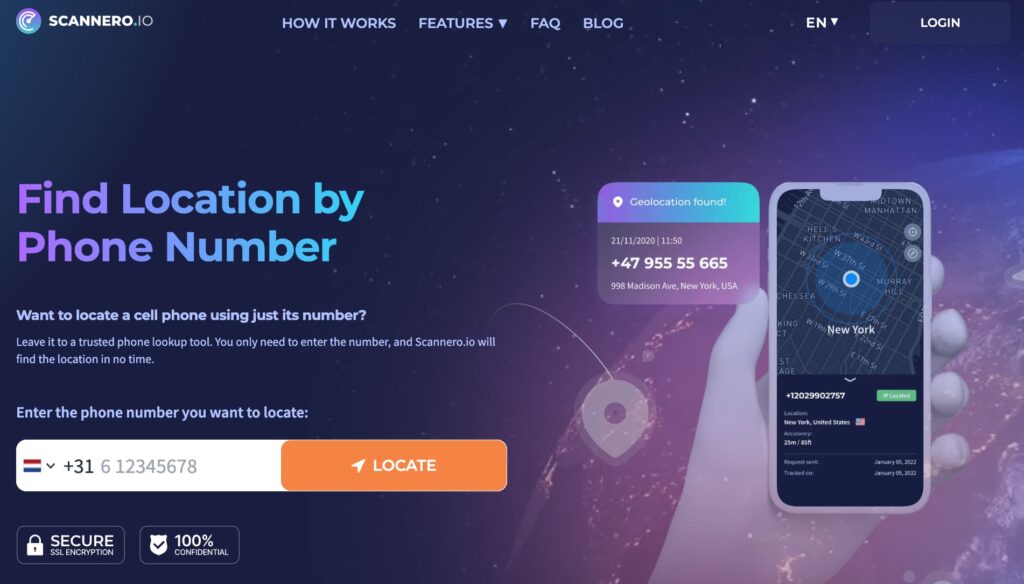
You need to find out where someone is, and you don’t want to ask them directly or install anything on their phone. That’s the exact problem Scannero solves.
Scannero is a browser-based phone tracking service. You enter the target number, write a short custom message (a delivery notification, a meeting reminder, a casual greeting — anything that makes sense in context), and Scannero generates a link embedded in that message. When the recipient opens the link on their device, their GPS location is captured and displayed on an interactive map that syncs with Google Maps. The entire setup takes under three minutes, and nothing needs to be installed on your end or theirs.
This link-based approach is how Scannero sidesteps the app installation requirement that most competitors impose. It works on any smartphone — Android or iOS — as long as the device has an active internet connection and the recipient opens the message.
Key features:
- Sends a tracking link via SMS, WhatsApp, or any messaging platform — you choose the channel
- Live location displayed on interactive map with Google Maps compatibility
- Works on any iOS or Android device — no app required on either end
- Location-by-link: the recipient doesn’t see a tracking interface, just the message you wrote
- Data leak checker, reverse phone number lookup, and reverse username lookup included in the platform
- Time-limited tracking to avoid indefinite data collection
Pricing: Subscription-based with a low-cost trial period available. Check scannero.com for current regional pricing.
Pros:
- No installation required on either device — the only action needed is the recipient opening a link
- Works across platforms (Android and iOS) without compatibility issues
- Returns GPS-accurate location data, not just city-level estimates
- Tracks any number globally, not limited to a specific carrier or region
Cons:
- The method depends on the recipient opening the link — if the message is ignored, no location is returned
- Not a free service — a subscription is required for full access
Best for: Anyone who needs to confirm a contact’s location without confrontation, locate a family member who isn’t responding, or verify that someone is where they say they are — all without requiring app installation on the target device.
Unlike app-based trackers that require physical access to the target phone for installation, Scannero’s link method requires only that the target receives and opens a message — the kind of action that happens naturally in everyday messaging.
Ready to track a phone number’s location? Visit scannero.com and enter the number to get started.
Detectico

Detectico uses the same link-based tracking mechanism as Scannero — you send a link, the recipient opens it, and their location is captured on a map interface. It’s a reliable option in this category and has been around long enough to build a recognisable presence in this space.
Key features:
- Link-based location tracking — no app required on target device
- Location displayed on interactive map with Google Maps integration
- Covers international numbers across multiple countries
Pricing: Subscription-based. Entry plans typically start around $0.83–$1.00 per day for trial access, then move to monthly billing.
Pros:
- Works without installing anything on the target device
- Clean interface with a straightforward step-by-step process
- International coverage
Cons:
- Like all link-based trackers, it requires the recipient to open the message
- Limited additional features beyond the core location tracking function
- Some users report inconsistent results when the link isn’t opened promptly
Best for: Users who want a focused, single-purpose link-based tracker and don’t need additional features like reverse lookup or data leak checking.
Google Maps Location Sharing
Google Maps has a built-in location sharing feature that’s free, accurate, and native to both Android and iOS. It doesn’t require any third-party tool — but it does require active cooperation from the person you want to track.
Key features:
- Real-time location sharing between two Google accounts
- Location updates live as the device moves
- Works on both Android and iOS via the Google Maps app
- Optional time limits on sharing (e.g., share for 1 hour, until end of day, or indefinitely)
Pricing: Free.
Pros:
- The most accurate mobile number tracking with Google Maps available — it’s Google’s own infrastructure
- No subscription cost
- Easy to set up if both parties have Google accounts and the Maps app
Cons:
- Requires the other person to actively turn on and share their location with you
- Sharing stops the moment they choose to turn it off
- Not useful for tracking someone who hasn’t agreed to share
Best for: Trusted contacts — couples coordinating meetups, parents monitoring teenage children who have agreed to share, or friends tracking each other during travel.
Google Find My Device
Google Find My Device is Google’s built-in tool for locating Android phones linked to a Google account. It shows the device’s location on Google Maps — but only for devices you own and have signed into.
Key features:
- Displays device location on Google Maps in real time
- Allows remote lock, sound trigger, and factory reset
- Works even if the device is offline (shows last known location)
- Available via findmydevice.google.com or the Google Find My Device app
Pricing: Free — built into all Android devices.
Pros:
- Native Google tool — no setup required beyond having a Google account signed in on the device
- Free and already installed on most Android phones
- Useful for recovering lost or stolen devices
Cons:
- Only works for devices signed into your Google account — can’t be used to track another person’s phone
- Requires the device to have been online recently for accurate location
- Not a solution for tracking unknown numbers or other people’s phones
Best for: Android users who have lost their own phone and need to find it quickly using Google Maps.
Apple Find My

Apple Find My is the iOS equivalent of Google Find My Device. It locates Apple devices linked to an iCloud account and displays their position on a map interface. It also supports Family Sharing, which allows parents or group members to see each other’s locations when all parties have opted in.
Key features:
- Real-time location of all devices signed into your Apple ID
- Family Sharing support — see locations of up to five family members who have agreed to share
- Works even when the device is offline using the Find My network (nearby Apple devices relay a signal)
- Available at icloud.com/find or through the Find My app on any Apple device
Pricing: Free — built into all Apple devices.
Pros:
- Extremely reliable within the Apple ecosystem
- Offline location detection via the Find My network is a genuine differentiator
- No additional app or subscription needed
Cons:
- Apple devices only — no cross-platform support
- Family Sharing requires explicit opt-in from each member
- Cannot locate non-Apple devices or arbitrary phone numbers
Best for: iPhone users wanting to find their own devices, or families where all members use Apple devices and have agreed to share locations.
Life360

Life360 is a family safety app built around continuous, opt-in location sharing within a private group called a “Circle.” Members install the app, join the circle, and their location appears on a shared map in real time. It’s not a phone number tracker in the traditional sense — it’s a coordinated family tracking platform.
Key features:
- Continuous real-time location sharing within a Family Circle
- Location history timeline showing where members have been
- Geofencing — get notified when a member arrives at or leaves a designated place (home, school, work)
- Driver safety reports on Android and iOS
- SOS alert feature for emergencies
Pricing: Free basic plan with limited features. Plus plan from approximately $7.99/month; Gold plan from $9.99/month. All members must install the app.
Pros:
- Designed specifically for ongoing family location monitoring — not a one-time lookup
- Geofencing alerts are genuinely useful for parents
- Works across Android and iOS within the same circle
Cons:
- Requires every member to install the app and actively participate — not suitable for tracking someone without their knowledge
- Monthly cost adds up for premium features
- Location updates can lag slightly on the free tier
Best for: Families who want ongoing, consensual location visibility across all members — particularly parents monitoring younger children or teenagers.
How Do Mobile Number Trackers with Google Maps Actually Work?
Three distinct mechanisms power the tools in this list. Understanding which method a tool uses tells you whether it will work in your situation.
- Link-based tracking (Scannero, Detectico). You send a specially generated link to the target number via any messaging channel. When the recipient opens the link on their phone, the device’s GPS fires and sends the coordinates back to your dashboard, which displays them on a Google Maps-compatible interface. The target doesn’t see a tracking confirmation — just the message you crafted. This works on any device and requires no app installation.
- Account-based tracking (Google Find My Device, Apple Find My). The tool locates a device by its association with a signed-in Google or Apple account. This is the most accurate method, but it’s limited to devices you own and have authenticated. You can’t use it to locate a stranger’s phone.
- App-based mutual tracking (Life360, Google Maps Location Sharing). Both the tracker and the target install an app or use a platform feature, and both agree to share their location. This is the most transparent method — and the least useful for locating someone who hasn’t opted in.
Legal context: In most jurisdictions, tracking someone’s phone location without their knowledge or consent is illegal. Link-based tools operate in a grey area — the recipient does take an action (opening a link), but they may not know it triggers location sharing. Always use these tools ethically and in line with local law.
Comparison Table: Best Mobile Number Trackers with Google Maps
| Tool | Method | App Required on Target? | Google Maps Compatible | Works on Any Number | Free Option | Pricing |
|---|---|---|---|---|---|---|
| Scannero | Link-based | No | Yes | Yes | No | Subscription — trial available |
| Detectico | Link-based | No | Yes | Yes | No | ~$0.83+/day trial, then monthly |
| Google Maps Sharing | Consent-based | No (built-in) | Yes — native | No (contacts only) | Yes | Free |
| Google Find My Device | Account-based | No (built-in) | Yes — native | No (own device only) | Yes | Free |
| Apple Find My | Account-based | No (built-in) | Apple Maps | No (Apple devices) | Yes | Free |
| Life360 | App-based mutual | Yes | Yes | No (circle members) | Yes (limited) | From $7.99/month |
Frequently Asked Questions
Can I track a phone number on Google Maps for free?
If the person has shared their location with you via Google Maps Location Sharing, yes — that’s free. For tracking numbers without prior consent or agreement, free tools are largely unreliable. Link-based trackers like Scannero and Detectico require a subscription. Built-in tools (Google Find My Device, Apple Find My) are free but limited to your own devices.
Do I need to install an app to track a phone number’s location?
Not with link-based trackers like Scannero. No installation is required on either the sender’s or receiver’s device — the recipient just needs to open the link. App-based platforms like Life360 require installation on every device in the group.
Is it legal to track someone’s phone location without their knowledge?
In most countries, no. Tracking a person’s location without their consent is illegal under privacy and surveillance laws. Link-based tools require the recipient to open a link, which constitutes a degree of interaction — but using any tracking tool to monitor someone without their awareness is ethically and legally problematic. Always check local laws and use location tracking only in appropriate, consensual contexts.
What’s the most accurate mobile number tracker with Google Maps?
For your own devices, Google Find My Device (Android) and Apple Find My (iOS) offer the highest accuracy — they pull directly from the device’s GPS. For tracking other numbers via link, Scannero and Detectico return GPS-accurate coordinates when the link is opened on a device with an active internet connection and location services enabled.

Related posts
 May 25, 2026
 May 25, 2026
 May 25, 2026





