


Table Of Contents
How to Track a WhatsApp Number: 4 Methods That Actually Work
People search for ways to track a WhatsApp number for different reasons: a parent checking whether a child is actually offline, someone receiving messages from an unknown number, or an individual trying to identify who a contact really is before responding.
Four methods cover the full range of situations. Which one works depends on whether you already know the person, whether you have access to their device, and whether they have agreed to share their location. This guide breaks down each method clearly so you can pick the right one for your situation.
What Does “Tracking a WhatsApp Number” Actually Mean?
Tracking a WhatsApp number can refer to three different things: identifying who owns the number, monitoring when someone is online or last active, or seeing where they are physically located.
WhatsApp uses end-to-end encryption, which means message content cannot be intercepted mid-delivery. What encryption does not protect is online status, profile information, or location data that the user voluntarily shares. This is an important distinction — many people assume E2E encryption makes all WhatsApp activity invisible, but that is not how it works. Online status, last seen timestamps, and shared locations remain observable through various methods.
Check Last Seen and Online Status Directly
This is the simplest form of WhatsApp number tracking and works when the number is already saved in your contacts.
- Open WhatsApp on your phone.
- Go to the chat with the person whose number you want to track.
- Tap on their name at the top of the screen to open their profile.
- Look below their name for “online” (if they are currently active) or a last seen timestamp.
- If a timestamp appears, it shows the most recent time they opened WhatsApp.
This works quickly and requires no additional tools. The limitation is significant: if the person has turned off their last seen visibility in their privacy settings — or has blocked you — the timestamp will not appear.
What to Do When Last Seen Is Hidden
WhatsApp added the option to hide last seen from all contacts in 2021. When this setting is active, you see nothing under their name, and no native WhatsApp feature overrides it.
In this case, a dedicated whatsapp online tracker app like WaStat can help. These tools work by detecting brief connectivity signals — small network pings that occur when the app is open — rather than relying on WhatsApp’s disclosed last seen data. They are not always precise, but they can indicate whether someone is active during a given window. Alternatively, if your goal is to identify who the number belongs to rather than when they are online, next method for you.
Use Reverse Phone Lookup to Identify the Number Owner
The first two methods assume you already know the person and have them in your WhatsApp contacts. Many readers arrive at this topic from a different starting point: they have received a message from an unknown number and want to know who it belongs to before doing anything else.
Native WhatsApp tools cannot help here — WhatsApp will only show a profile if the account owner has made it visible. When the profile is blank or private, there is no way to identify the person through the app itself.
That gap is where a reverse phone lookup becomes the right tool. When you receive messages from an unrecognized number and have no idea who is behind it, a whatsapp number lookup searches public records, people-search databases, and indexed social profiles to connect that number to a real name, location, and associated accounts.
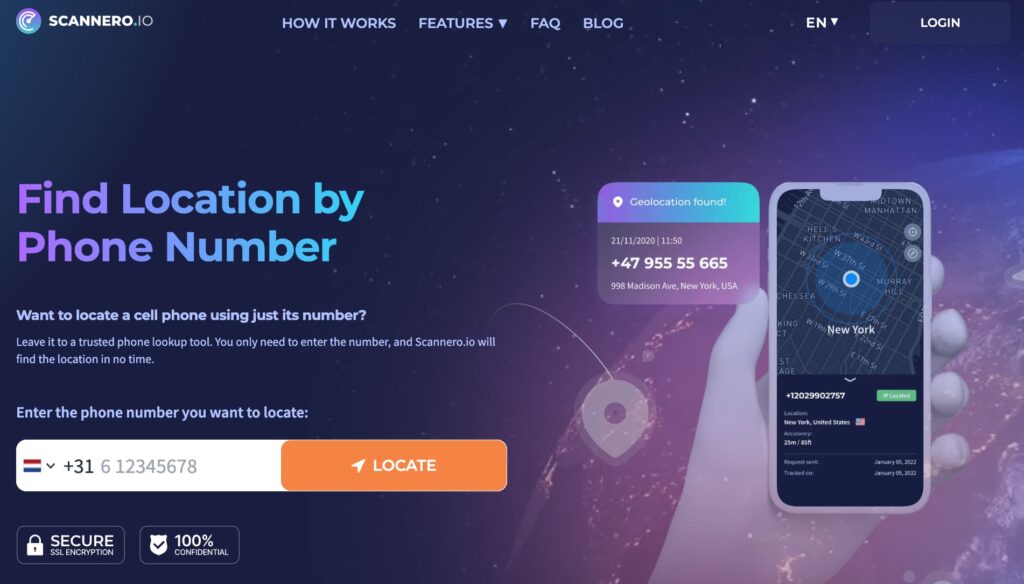
Scannero is built for this exact scenario. Enter the unknown number, and within minutes it returns the name registered to that number, geographic location, and linked social profiles — without requiring any app to be installed on the target’s device, and without the target being notified.
How Scannero Works
Scannero runs the phone number through a database that aggregates public records, carrier registration data, and indexed social media profiles. The output is a single readable report: the name associated with the number, approximate location, and any social accounts — including WhatsApp-registered profiles — linked to the same identity.
Getting started takes four steps:
- Go to Scannero.com.
- Enter the phone number, including the country code.
- Run the search.
- Review the report — name, location, and linked profiles appear in under two minutes.
No installation is required on the target’s device. The search runs anonymously.
Use WhatsApp Web to Monitor Messages and Activity

WhatsApp Web mirrors an account’s messages to a computer browser. This method gives access to message history and incoming messages in real time — but it requires briefly scanning a QR code from the target device.
- On a computer, open a browser and go to web.whatsapp.com.
- A QR code will appear on the screen.
- Pick up the target device and open WhatsApp.
- Tap the three-dot menu (Android) or Settings (iPhone) and select Linked Devices.
- Tap “Link a Device” and point the phone’s camera at the QR code on the computer screen. Once scanned, the account syncs to the browser.
One important caveat: WhatsApp notifies the account holder of every linked device. The notification appears in their Linked Devices menu and, depending on their settings, may generate an alert. This method should only be used on your own devices or with the full knowledge of the account holder.
Use WhatsApp’s Live Location Sharing Feature
Live location sharing is WhatsApp’s built-in real-time whatsapp location tracking feature. It is the only native method that shows where someone physically is — but it only works when the person agrees to share.
- Open a chat with the person.
- Tap the attachment icon (paperclip on Android, + on iPhone).
- Select “Location” then “Share Live Location.”
- Choose a duration: 15 minutes, 1 hour, or 8 hours.
- The recipient sees a live map that updates in real time until the timer expires or sharing is stopped.
You can also ask the other person to share their live location with you using the same steps. This is the most accurate whatsapp location tracking method available natively, but it depends entirely on the other person’s willingness to participate.
WhatsApp Tracking Methods Compared
| Feature / Criteria | Method 1: Last Seen | Method 2: WhatsApp Web | Method 3: Scannero Lookup | Method 4: Live Location |
|---|---|---|---|---|
| Requires access to target device | No | Yes (briefly) | No | No |
| Works without target’s knowledge | Partial | Partial | Yes | No |
| Shows real-time location | No | No | No (shows area) | Yes |
| Identifies who owns the number | No | No | Yes | No |
| Free to use | Yes | Yes | Paid | Yes |
| Works if last seen is hidden | No | Yes | Yes | No (consent needed) |
| Works for unknown numbers | No | No | Yes | No |
For three of the four tracking goals — checking activity, reading messages, and finding a live location — native WhatsApp tools cover the situation adequately when the person is already a known contact who cooperates. The scenario none of them handles is the most common one: an unknown number where you need to establish identity before any contact. Scannero fills that gap directly. It is most suitable for individuals, parents, and small business owners who need to verify who is behind an unknown WhatsApp number — without alerting the person or touching their device.
Is It Legal to Track a WhatsApp Number?
Using a public records database to identify who owns a phone number is legal in most jurisdictions under the same principles that make people-search services legal. Parents monitoring a minor child’s device activity are legally permitted to do so in most countries. Using WhatsApp Web to covertly monitor an adult’s account without their consent violates WhatsApp’s Terms of Service and, in many places, local wiretapping or surveillance laws. The same applies to spy apps that operate without the target’s knowledge on an adult’s device. Any tracking method should be used for legitimate purposes — verifying an identity, ensuring a child’s safety, or monitoring a device you own.
Frequently Asked Questions
Can I track a WhatsApp number without them knowing?
It depends on the method. Checking last seen status and running a reverse phone lookup are passive and do not notify the other person. WhatsApp Web and live location sharing both generate notifications visible to the account holder. Scannero’s reverse lookup identifies the person associated with a number without alerting them.
Does WhatsApp encryption prevent location tracking?
No. WhatsApp’s end-to-end encryption protects the content of messages and calls in transit. It does not hide online status, last seen timestamps, profile photos, or location data that the user has shared. Third-party tools that analyze public data — rather than intercepting WhatsApp’s network traffic — are unaffected by E2E encryption.
Can I find out who a WhatsApp number belongs to?
Yes, through a whatsapp number lookup service. WhatsApp itself does not display account holder names to strangers — it only shows what the user has made public in their profile. A reverse lookup cross-references the number against public records and returns the registered name and associated information independently of WhatsApp’s privacy settings.
Is there a free WhatsApp number tracker?
WhatsApp’s built-in last seen check and live location feature are free. Dedicated whatsapp tracker apps that monitor online/offline status (like WaStat) typically have free tiers with limited history. Reverse phone lookups that identify who owns a number — like Scannero — operate on a subscription or per-search basis, as they access and process paid data sources.
The Right Method for Your Situation
Match the method to your actual need: if you know the person and want to see when they are active, Method 1 covers that in seconds. If you have device access and need to see messages, Method 2 gives you full visibility. If you want to know where someone is right now and they agree to share, Method 4 is the only reliable option.
If you have an unknown number and need to establish who is behind it before doing anything else — that is the situation Scannero is built for. Rather than guessing or waiting for the person to reveal themselves, enter the number at Scannero.com and get the name, location, and linked profiles back in under two minutes.

Related posts
 May 25, 2026
 May 25, 2026
 May 25, 2026





