


Table Of Contents

How to Track Phone Location History on Any Device
Every smartphone logs where it has been. The question is knowing where to look — and what to do when the phone you need to check isn’t in your hands.
This guide covers how to track phone location history on Android and iPhone using built-in tools, how to access the iOS Significant Locations feature, and what options exist when you need to track someone else’s device remotely.
What Is Phone Location History?
Phone location history is a record of the places a device has visited, logged automatically by GPS, cell towers, and Wi-Fi signals. On Android, this data is tied to a Google Account through Google Maps Timeline. On iPhone, Apple stores location data locally through a feature called Significant Locations.
One important change: since late 2023, Google moved Timeline storage from the cloud to the device itself. This means your location history no longer syncs across devices via your Google Account — it lives on the specific phone where it was recorded. If you’re looking for location history from a device you no longer have, that data may no longer be accessible through Google.
How to Check Location History on Android
Android location history is managed through Google Maps. These steps apply to most Android devices:
- Open the Google Maps app on the Android device.
- Tap your profile photo in the top-right corner.
- Tap “Your Timeline.”
- Browse by day, month, or year to view past routes and places visited.
- Tap any day to see a detailed map with timestamps.
For this to work, Location History must be enabled in the Google Account linked to the device. If Timeline is empty, the user may have disabled location tracking or deleted past data.
How to Check Location History on iPhone

iPhone offers two ways to access location history. The first uses Google Maps — the same steps as Android — if the Google account is signed in on the device.
The second method uses iOS Significant Locations, which is stored directly on the device and is more private:
- Open Settings on the iPhone.
- Tap Privacy & Security.
- Tap Location Services.
- Scroll down and tap System Services.
- Tap Significant Locations.
- Authenticate with Face ID or passcode.
- Browse by city or date to see frequently visited places, trip summaries, and routes.
Significant Locations tracks iphone location history by date and groups visits by location type. It is not accessible remotely — you need physical access to the device to view it.
If you want to see location history on Find My: Find My only shows the current location of a device, not a historical route. It does not function as a location history log.
How to Enable or Disable Location History
To turn on Google location history on Android or iPhone:
- Go to myaccount.google.com on a browser.
- Click “Data & Privacy.”
- Under “History settings,” click “Location History.”
- Toggle it on or off.
To delete past data, open Google Maps Timeline and tap the trash icon on any day. To erase all data, go to Google Account > Data & Privacy > Delete activity by > All time.
To turn off google location history entirely, toggle it off in the same settings. Once disabled, Google Maps will stop recording new locations, but existing data is not automatically deleted.
How to Track Someone Else’s Phone Location History
Tracking another person’s phone is a common need for parents monitoring a child, someone recovering a lost device, or verifying a family member’s safety. Native tools handle this in three ways:
- Google Family Link: Lets parents see a child’s real-time location on Android. Shows current position, not a historical route.
- Apple Find My: Shows real-time location of an iOS device linked to the same Apple ID or shared in a Family Sharing group. No location history view.
- Google Maps location sharing: A person can share their live location with you for a set period. Again, real-time only — no history log.
The limitation these methods share: they all require either physical access to the device, a shared account, or the other person’s active consent to share. If you need to track phone location history remotely — without holding the device or setting up an account beforehand — none of these work.
This is where the problem gets harder to solve without a purpose-built tool. When someone needs to track location history by phone number alone, with no app installation on the target device, native options fall short.
How Scannero Works: Track Location History by Phone Number
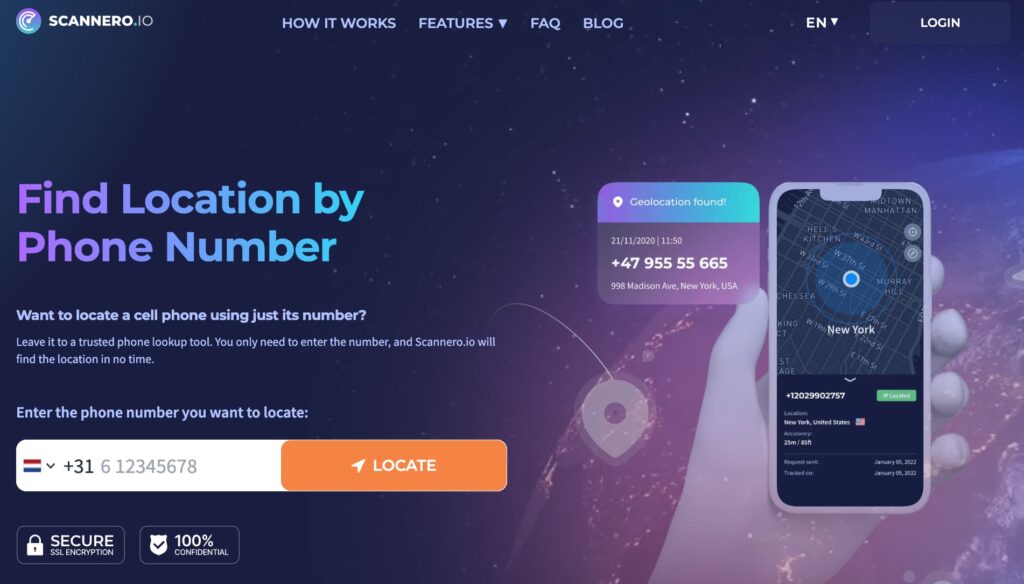
Scannero is a web-based phone location tracker that works from a phone number. It does not require installing an app on the device being tracked. Here is how it works: you enter the target phone number, Scannero generates a discreet tracking link and delivers it to that number, and when the link is opened the device’s GPS coordinates are captured and logged to your dashboard.
To get started:
- Go to scannero.com and create an account.
- Enter the phone number you want to track.
- Scannero sends a tracking link to that number.
- Once the link is opened, location data appears on your dashboard with timestamps.
- View the location history log from any browser.
Scannero works on both Android and iPhone. No software installation is required on the target device, and the process takes under five minutes from signup to first result.
Comparing Location Tracking Methods: Native vs. Third-Party
| Feature / Criteria | Scannero | Google Maps Timeline | Find My (iOS) | Life360 |
|---|---|---|---|---|
| Works without device access | Yes | No | No | No |
| Tracks by phone number | Yes | No | No | No |
| Shows location history log | Yes | Yes | No | Yes |
| No app needed on target device | Yes | No | No | No |
| Works on both iOS and Android | Yes | Android-primary | iOS only | Both |
| Real-time location updates | Yes | No (timeline only) | Yes | Yes |
| Requires target’s consent/account setup | No | Yes | Yes | Yes |
When the goal is to track someone else’s location history without prior setup, Scannero is the only method here that does not require access to the target device or a pre-existing account arrangement. For parents who need to check on a child without alerting them, or anyone tracking a phone by number for the first time, Scannero fits that use case where native tools cannot.
Frequently Asked Questions
Can you see location history on Find My iPhone?
No. Find My shows the current or last known location of a device — it does not display a route or historical log of past positions. For iphone location history by date, you need to check Significant Locations in the device’s privacy settings.
How far back does phone location history go?
Google Maps Timeline stores data until you delete it, but since the 2023 on-device migration, history is only accessible from the specific device that recorded it. iOS Significant Locations retains data for roughly one year. Scannero logs location data from the point tracking begins.
Can someone track my location history without me knowing?
Using purely native tools — Google Timeline, Find My, or Family Link — someone would need access to your device or account. A tool like Scannero works when a tracking link is opened, so awareness depends on whether the person opens the link.
Is it legal to track someone’s phone location?
Laws vary by country and state, but in most jurisdictions tracking another adult without their knowledge or consent is illegal. Tracking a minor child as a parent is generally permitted. Always check local laws before tracking another person’s device.
What happens to location history if it is turned off?
Turning off Google Location History stops new data from being recorded. Existing data remains in your account until you delete it manually. iOS Significant Locations also stops recording if Location Services are disabled under System Services.
Start Tracking Phone Location History Today
Every major phone platform offers some form of location history, but the method you need depends on what you are trying to do. Google Maps Timeline works well for reviewing your own Android movement history. iOS Significant Locations gives iPhone users a private, on-device record. For tracking another person’s phone without physical access, Scannero handles location history by phone number in under five minutes — no app installation, no shared account, no device access needed.
If the built-in tools do not cover your situation, Scannero is the direct solution. Visit scannero.com to start tracking.

Related posts
 May 25, 2026
 May 25, 2026
 May 25, 2026





